Learn to Code-03 - page from the textbook
Back to Class
2

Learn to Code-03

33-61 • Source: SCERT Delhi ICT Textbook, Revised Edition 2026 3 Fun Facts
8 min read

The field guide

Understand it. Try it. Remember it.

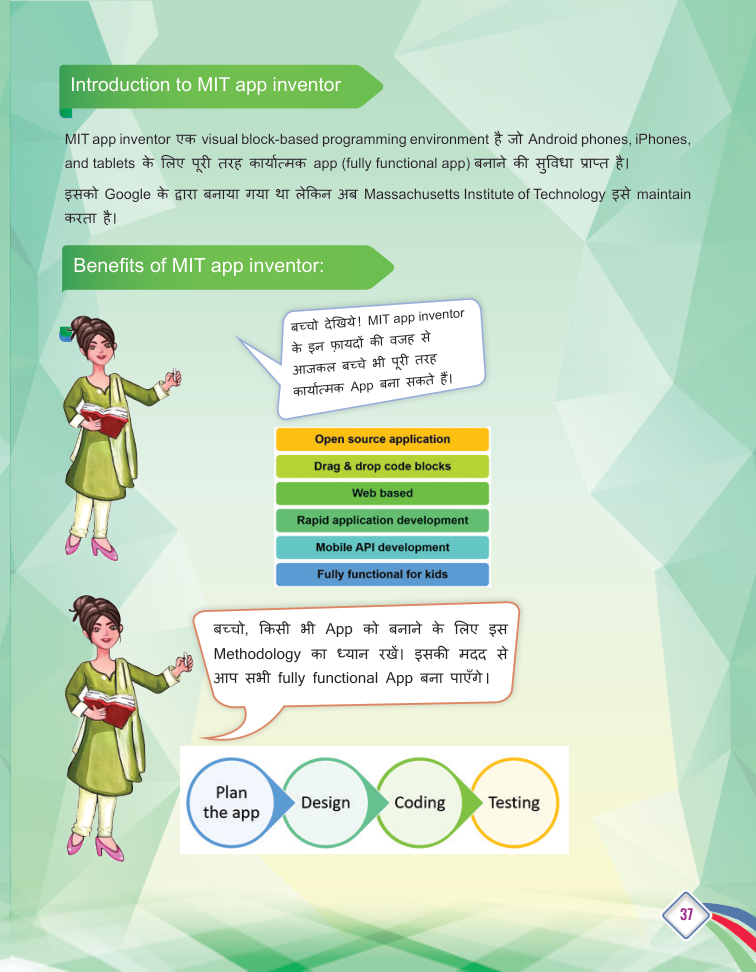
An app is a small system designed around a user's task. Plan the screens and controls first, connect them with blocks, then test on a device or emulator and improve the app when real use reveals confusion.

Textbook reference: pages 33-61

01
Design screen
Add logic
03
Test app
Concept mapFollow the pathLearn to Code-03: Design screen, Add logic, Test app

In this lesson

01

Types of Apps

Definition

Definition: Mobile apps are programs that run on smartphones. They are grouped into different types based on their purpose.

  • Games - for entertainment.
  • Educational apps - for learning.
  • Social media apps - for communication and sharing.
  • Shopping apps - for online buying.
  • Utility apps - for daily tasks like torch, calculator.
02

MIT App Inventor

Definition

Definition: MIT App Inventor is a block-based tool for building Android apps - available online or as an offline version. Instead of typing code, you snap puzzle-like blocks together.

  • Design your app's screens in the Designer.
  • Define the behaviour using Blocks.
03

App Design Components

  1. 1

    Layout: Arranges elements neatly on the screen.

  2. 2

    Label: Shows text to the user.

  3. 3

    Textbox: Lets the user type input.

  4. 4

    Button: Performs an action when tapped.

  5. 5

    Media: Adds images and sounds to the app.

04

Testing and Launching the App

  • Test the app on an Android mobile or a Mobile Emulator (offline emulator can be downloaded).
  • Fix any problems found during testing.
  • Export the finished app as an .apk file.
  • Install the .apk on a mobile to launch the app.

Your turn

Try a quick challenge

Sketch a two-screen app that helps a student track homework. Label one action on each screen and how the information moves.

Quick Revision

  • App: a program that runs on a mobile.
  • MIT App Inventor: block-based Android app builder.
  • Emulator: software that imitates a mobile for testing.
  • .apk: the Android app file to install.
  • Components: building blocks like Layout, Label, Button.

Conclusion: With MIT App Inventor, anyone can design, build and launch a working Android app - design the screen, snap the blocks, test, and export the .apk.

Keep in mind

Quick recap

  • Start from a user need and a simple screen plan.
  • Connect visible controls to logic and data.
  • Test realistic, empty and unexpected inputs before sharing.

Key Terms

MIT App Inventor

ब्लॉक-आधारित मोबाइल ऐप बिल्डर

Layout

स्क्रीन पर तत्वों की व्यवस्था

Emulator

मोबाइल का सॉफ्टवेयर अनुकरण

.apk

Android ऐप इंस्टॉल फ़ाइल

Component

ऐप का भवन-खंड जैसे Button, Label