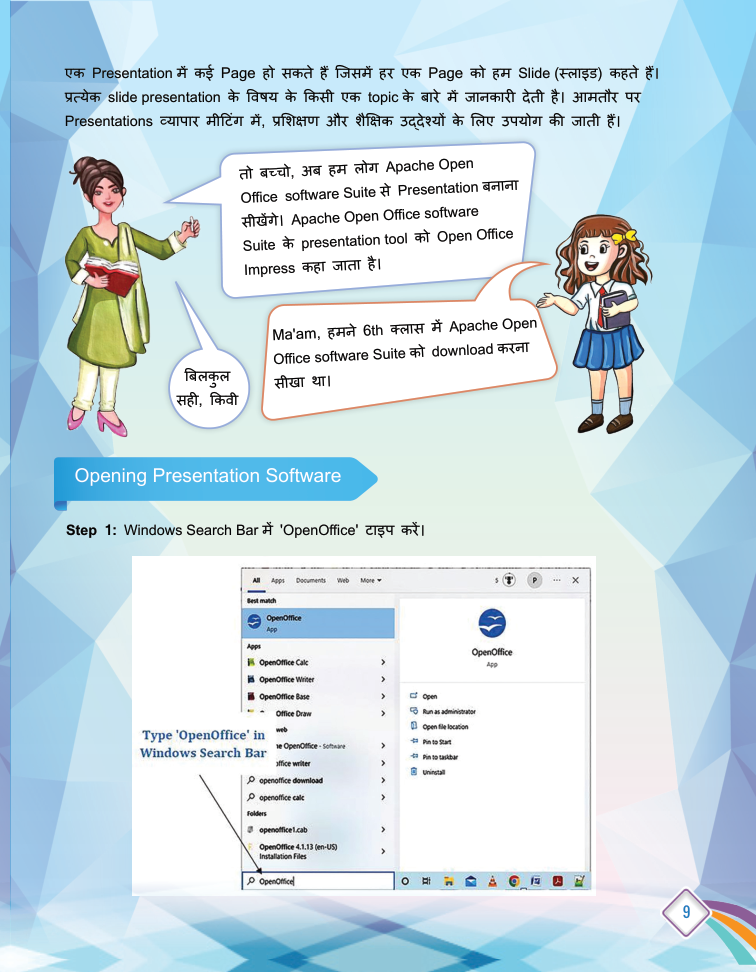
Data Representation and Processing-03 (Presentation Tool) - page from the textbook
Back to Class
1

Data Representation and Processing-03 (Presentation Tool)

5-33 • Source: SCERT Delhi ICT Textbook, Revised Edition 2026 3 Fun Facts
8 min read

The field guide

Understand it. Try it. Remember it.

A presentation is a visual story, not a document split across slides. Plan one idea per slide, use images and diagrams when they clarify the message, and keep the design consistent so an audience can follow along.

Textbook reference: pages 5-33

01
One idea
Strong visual
03
Clear story
Concept mapFollow the pathData Representation and Processing-03 (Presentation Tool): One idea, Strong visual, Clear story

In this lesson

01

Presentation and Slides

Definition

Definition: A presentation is made of several pages, and each page is called a Slide. Every slide gives information about one topic of the presentation's subject.

Uses of Presentations

  • Business meetings.
  • Training sessions.
  • Educational purposes - like the class zoo-trip photo story.
02

OpenOffice Impress

Definition

Definition: Impress is the presentation tool of the Apache OpenOffice software suite.

Opening Impress

  1. 1

    Step 1: Type 'OpenOffice' in the Windows search bar.

  2. 2

    Step 2: Open the OpenOffice suite (downloaded in Class 6).

  3. 3

    Step 3: Choose Presentation and start making slides.

03

Enhancing Slides

  1. 1

    Formatting: Improve text look - fonts, colours, layout.

  2. 2

    Images: Add pictures to make slides attractive.

  3. 3

    Sound: Insert audio into slides.

  4. 4

    Animation: Adds movement effects to objects on a slide.

  5. 5

    Slide Transition: The effect applied when moving from one slide to the next.

04

Using an AI Chatbox

Definition

Definition: An AI chatbox can help gather information and ideas for presentation content.

Your turn

Try a quick challenge

Plan three slides to teach a younger student one idea. Give each slide a message before selecting its image.

Quick Revision

  • Slide: one page of a presentation.
  • Impress: OpenOffice's presentation tool.
  • Animation: movement effect on slide objects.
  • Slide Transition: effect between slides.
  • AI Chatbox: tool to gather information by asking.

Conclusion: With Impress you can turn any story - like a zoo trip - into a colourful presentation with images, sound, animation and transitions.

Keep in mind

Quick recap

  • A slide should support one clear point.
  • Readable type, useful visuals and consistent spacing help an audience.
  • Check AI-generated claims and credit sources for borrowed media.

Key Terms

Slide

प्रेजेंटेशन का एक पेज

Impress

OpenOffice का प्रेजेंटेशन टूल

Animation

वस्तुओं में गति का प्रभाव

Slide Transition

स्लाइडों के बीच बदलाव का प्रभाव

AI Chatbox

जानकारी पूछने के लिए AI वार्तालाप उपकरण