01
What is a Word Processor?
Definition
Definition: A word processor is application software used to create, edit and format text documents. OpenOffice Writer is the word processor taught in the book.
- Used for letters, applications, stories, reports and notes.
- Documents can contain text, images and tables.
02
Creating a Document
- 1
Step 1: Open the OpenOffice suite.
- 2
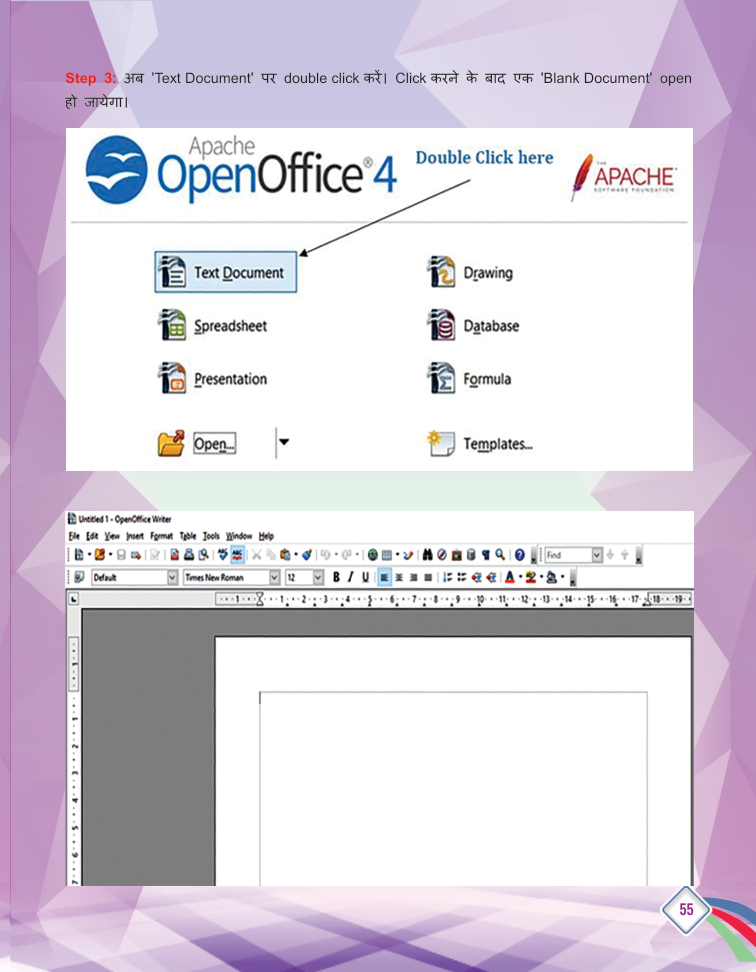
Step 2: Double-click 'Text Document'.
- 3
Step 3: A blank document opens - start typing.
- 4
Step 4: Save the document in your folder.
03
Formatting Text
- 1
Bold: Displays text in a darker, heavier form.
- 2
Italic: Shows the text slightly tilted.
- 3
Underline: Draws a line below the text.
Text Highlighting
- Sets the background colour behind text.
- Select the part of the text, then click the highlighting icon.
- Text can be highlighted in many different colours.